For modern knowledge workers, a keyboard is the primary tool used to translate thoughts into reality. Despite spending eight or more hours a day typing, the vast majority of professionals rely on cheap, mass-produced keyboards bundled with their computers. These standard devices often feel mushy, lead to frequent typos, and can contribute to hand fatigue over long periods.
Upgrading your primary input device is one of the most effective ways to bridge the physical gap between you and your digital work. Understanding the mechanics behind a premium typing experience reveals that it is not just about aesthetics. This guide explores the sensory and physical benefits of high-quality peripherals, explaining exactly how specific feedback mechanisms can drastically improve your daily focus.
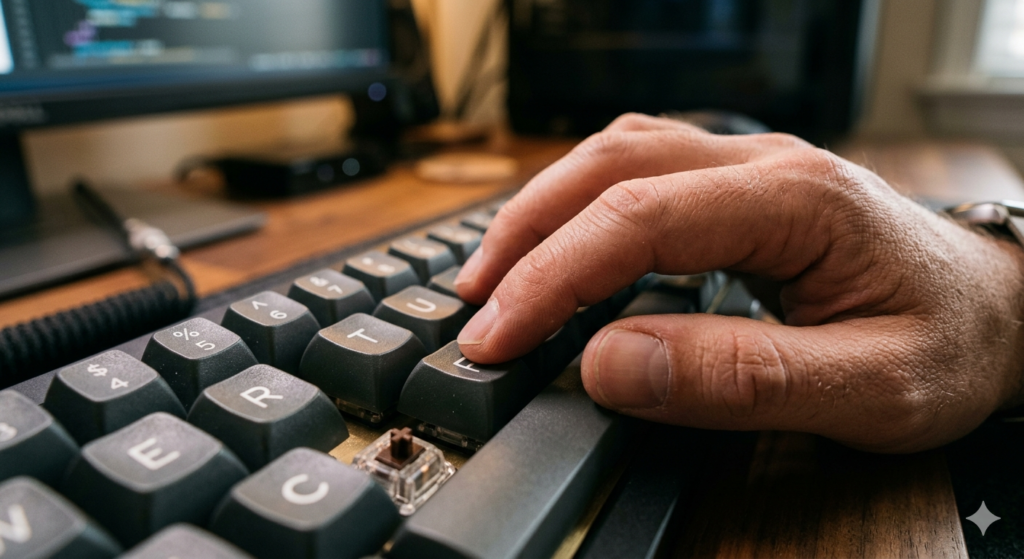
The Mechanics Behind the Keystroke
To understand the benefits, you must first understand the fundamental difference in construction between standard and mechanical hardware.
Why mechanical keyboards help typing comes down to their physical construction. Unlike standard keyboards that use a single rubber membrane, mechanical keyboards use individual, spring-loaded physical switches under every key. This design provides immediate sensory confirmation of every keystroke, significantly reducing finger fatigue and minimizing typing errors.
On a standard membrane keyboard, you must press the key all the way down until it squishes against the bottom layer to register a letter. This is known as “bottoming out.” Bottoming out sends a tiny shockwave through your fingers with every single strike. Over the course of thousands of words, this continuous impact contributes heavily to hand and wrist fatigue.
Mechanical switches, however, register the keystroke halfway down. The spring mechanism stops your finger before it hits the hard plastic base. This dramatically reduces the physical impact on your joints during long writing sessions.
The Power of Tactile Feedback and Auditory Cues
The defining characteristic of a premium typing experience is the sensory engagement it provides. Mechanical switches are engineered to communicate with your nervous system.
When you press a mechanical key, you feel a distinct physical bump at the exact moment the letter registers on your screen. This is known as tactile feedback. Your fingers instantly learn this sensation, allowing your brain to subconsciously confirm that the keystroke was successful without needing to visually verify it on the monitor.
In addition to touch, many switches provide distinct auditory cues in the form of a sharp “click.” This multi-sensory confirmation loop—feeling the bump and hearing the click—creates a highly rhythmic typing experience. This rhythm helps anchor your attention to the present moment, keeping your mind engaged with the physical act of writing.
Understanding Switch Types
One of the greatest advantages of this hardware is the ability to customize the feel to your exact preferences. Not all switches behave the same way.
There are generally three main switch types:
- Linear: These provide a perfectly smooth keystroke with no bump or click, ideal for quiet environments and rapid, repetitive presses.
- Tactile: These feature a noticeable physical bump without the loud audible click, offering great feedback for typists who share an office.
- Clicky: These feature both the physical bump and a loud, typewriter-like sound for maximum sensory feedback.
Selecting the right switch is a highly personal choice based on your typing style and acoustic environment. Many professionals start their journey by investing in a versatile Keychron or generic Mechanical Keyboard that allows them to easily swap out switches without soldering. This customization ensures your primary tool perfectly matches your physical needs.
Improving Typing Speed and Accuracy
Because your brain receives instantaneous physical confirmation when a letter is registered, you hesitate less. This lack of hesitation directly translates to improved performance.
When you use a mushy membrane keyboard, you inevitably miss letters because the rubber dome fails to register a light press. You then have to stop, backspace, and correct the error, breaking your train of thought. Mechanical keys actuate predictably and consistently every single time.
As you develop muscle memory for the exact actuation point of your chosen switch, your typing speed naturally increases. You learn to let your fingers glide across the keys, pressing them just enough to register without fully bottoming out, creating a faster, more fluid typing motion.
Enhancing Typing Ergonomics for Deep Work
The physical benefits of these devices extend beyond the fingertips. The sensory engagement of a mechanical keyboard plays a distinct psychological role in your daily focus.
When a tool feels satisfying to use, you are naturally more inclined to use it. The deliberate, tactile nature of mechanical keys turns the mundane act of typing into an engaging physical activity. This is why optimizing your typing ergonomics is a core component of building a true Distraction Free Workspace.
By reducing the physical strain on your hands and providing satisfying sensory feedback, mechanical keyboards remove a subtle layer of physical friction from your work. This allows your brain to direct its full energy toward the complex, creative tasks on your screen.

Conclusion
Understanding why mechanical keyboards help is about recognizing the importance of sensory feedback in our digital lives. By replacing mushy, unresponsive plastic with precision-engineered springs and switches, you physically transform your relationship with your work. The combination of satisfying auditory cues, distinct tactile feedback, and customizable switch types drastically improves your typing ergonomics. Ultimately, reducing finger fatigue and minimizing errors allows you to type faster, work longer, and maintain a deeper state of focused concentration.
Frequently Asked Questions (FAQ)
What is the difference between a membrane and a mechanical keyboard?
A membrane keyboard uses a single, flat rubber dome sheet under all the keys, which must be fully depressed to register a keystroke. A mechanical keyboard uses individual, independent switches with metal springs under every single key, providing a more precise and durable typing experience.
Do mechanical keyboards actually increase typing speed?
Yes. Because mechanical switches actuate (register) halfway through the keystroke, typists do not need to press the keys all the way down. Combined with the physical feedback that confirms a successful press, this reduces hesitation and allows for significantly faster, more fluid typing.
Are mechanical keyboards bad for typing ergonomics?
No, they generally improve ergonomics. While the keyboards themselves are often thicker (which may require a wrist rest to keep wrists straight), the reduced need to “bottom out” the keys heavily decreases the repetitive impact strain on finger joints.
Are all mechanical keyboards loud and clicky?
No. The noise level depends entirely on the switch types used. While “clicky” switches are intentionally loud, “linear” switches are completely smooth and can be nearly as quiet as a standard laptop keyboard when typed on gently.