Surviving a modern corporate office job requires more than just professional expertise; it requires aggressive defense of your attention. Employees are continuously bombarded by urgent emails, instant messaging pings, and back-to-back video calls. This “always-on” culture is a fast track to chronic stress and severe burnout, leaving workers feeling exhausted long before the workday officially ends.
Navigating this hyper-connected environment demands a strategic approach to how you use your company’s communication tools. By implementing targeted digital wellness tips for employees, you can systematically regain control over your time and cognitive energy. This guide provides practical strategies for setting professional boundaries, managing digital expectations, and protecting your mental health in a demanding corporate landscape.

The Corporate Digital Burden
Before implementing specific tactics, it is crucial to define what a healthy relationship with workplace technology actually looks like.
Digital wellness for employees is the practice of establishing healthy boundaries with workplace technology to prevent burnout. It involves managing digital communications, setting explicit availability hours, and utilizing tools intentionally to protect cognitive energy and maintain a sustainable work-life balance in a corporate environment.
In many organizations, responsiveness is falsely equated with productivity. Employees feel pressured to reply to messages instantly, fearing that a delayed response will be viewed as a lack of dedication. This culture of immediate gratification fragments your attention span, making it impossible to focus on complex, high-value projects. Reclaiming your workday starts with dismantling the expectation of constant availability.
Establishing Firm Email Boundaries
Email remains the primary source of digital anxiety for many professionals. The pursuit of “Inbox Zero” is often a futile effort that distracts you from your actual job responsibilities.
To protect your time, you must establish strict email boundaries. Stop keeping your inbox open as a permanent tab on your browser. Instead, schedule specific blocks of time—perhaps once in the morning, once after lunch, and once before logging off—to process and respond to messages in batches.
Most importantly, refrain from sending or replying to non-urgent emails outside of standard business hours. When you reply to an email at 9:00 PM, you implicitly train your colleagues and managers to expect late-night responses in the future. If you must work late, utilize the “schedule send” feature so your emails arrive the following morning.
Navigating Modern Slack Etiquette
Instant messaging platforms have revolutionized workplace communication, but they have also introduced a relentless stream of interruptions.
Mastering proper slack etiquette (or Microsoft Teams etiquette) is essential for your digital survival. Treat these platforms as tools for asynchronous communication, not walkie-talkies. You are not obligated to reply the exact second a message arrives.
Utilize your status indicators ruthlessly. If you need to concentrate, change your status to “Deep Work – Slow to Respond” and pause your notifications. This communicates to your team that you are actively working and sets a clear boundary without requiring you to apologize for your delayed response.
Combating Chronic Meeting Fatigue
Since the shift to hybrid and remote work, the number of daily meetings has skyrocketed. Staring at a grid of faces on a screen requires intense cognitive processing, leading to a very real phenomenon known as meeting fatigue.
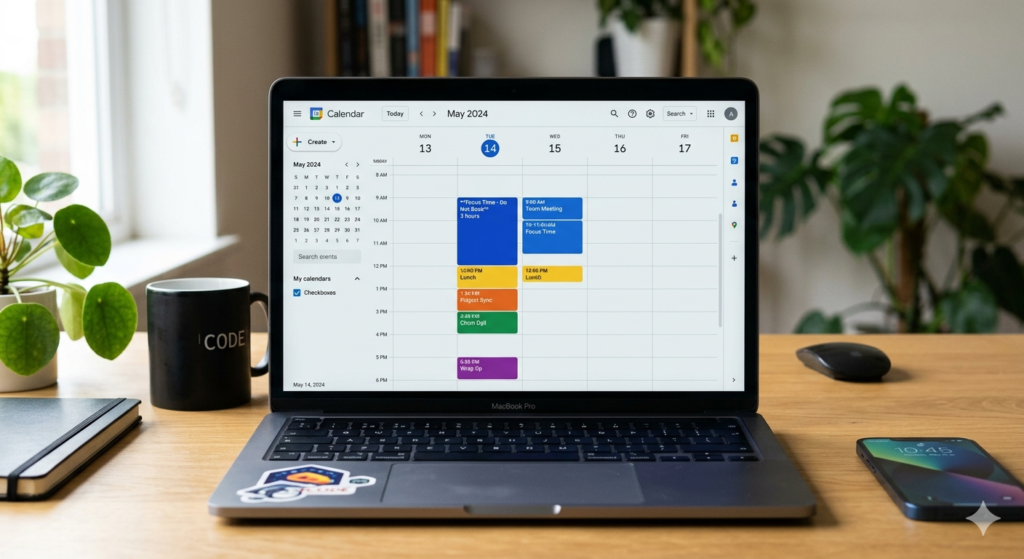
To combat this exhaustion, critically evaluate your calendar. If a meeting lacks a clear agenda or if your active participation is not required, politely decline or ask for a recorded summary. Protect your time by blocking out “Focus Time” on your shared calendar, physically preventing colleagues from scheduling calls during your most productive hours.
Furthermore, advocate for a team culture of 25-minute or 50-minute meetings. This simple scheduling tweak builds in mandatory 5-to-10-minute transition buffers, allowing you to stretch, hydrate, and rest your eyes before the next call begins.
The Right to Disconnect and Open Offices
The final piece of employee digital wellness involves physical and psychological separation from your work. Many countries and progressive companies are now officially recognizing the right to disconnect, which legally protects an employee’s choice to ignore work-related communications outside of working hours.
Even if your company does not have a formal policy, you must enforce this right for yourself. When the workday ends, log out of your corporate accounts and silence work-related apps on your personal smartphone.
For those returning to busy open-plan offices, physical boundaries are just as important as digital ones. The constant chatter and movement can shatter your concentration. If you work in a noisy environment, employing low-profile noise-canceling earplugs can physically block out office distractions without isolating you completely. Understanding the Definition of Deep Work clarifies exactly why these physical and digital boundaries are so critical: without them, achieving high-value, meaningful output in a modern office is virtually impossible.
Conclusion
Implementing effective digital wellness tips for employees is not about avoiding hard work; it is about protecting your capacity to do your best work over the long term. By aggressively managing your email boundaries, enforcing proper Slack etiquette, and taking steps to reduce meeting fatigue, you reclaim your working hours from the chaos of constant interruptions. Embracing your right to disconnect ensures that you have the time and space necessary to recharge, ultimately making you a healthier, happier, and more effective professional.
Frequently Asked Questions (FAQ)
What is the “right to disconnect”?
The right to disconnect is a legal or organizational principle that allows employees to refrain from engaging in work-related electronic communications (such as emails, calls, or messages) outside of standard working hours without facing penalties or negative consequences.
How can I set email boundaries without upsetting my boss?
Communication is key. Have a proactive conversation with your manager about your workflow. Explain that to produce high-quality work, you will be checking your inbox in batches rather than constantly. Establish a separate, emergency-only channel (like a phone call) for truly urgent matters.
What is proper Slack etiquette for deep work?
Proper etiquette involves respecting your colleagues’ focus. Use the status feature to indicate when you are busy, utilize threads to keep conversations organized, and avoid sending solitary greetings like “Hi” without immediately following up with the actual question or context.
How do you recover from meeting fatigue?
To recover, build mandatory 5-to-10-minute buffers between calls to step away from your screen. Advocate for “no-meeting” days within your team, and whenever possible, transition video calls to traditional phone calls to allow yourself to pace or look away from the monitor.