By the middle of the afternoon, millions of professionals experience a familiar, uncomfortable sensation: heavy eyelids, a dull ache behind the eyes, and a sharp tension headache. As our reliance on digital devices grows, this physical discomfort is becoming an unavoidable part of the modern workday. However, while you may not be able to eliminate screen time from your career, you do not have to accept chronic pain as a permanent condition.
If you are looking for immediate relief, small, targeted adjustments to your workflow and physical environment can drastically mitigate these symptoms. Knowing how to reduce digital eye strain is about actively managing the physical toll that screens take on your ocular muscles. This guide provides highly actionable, daily habits to protect your vision, soothe dry eyes, and maintain your cognitive endurance from morning until evening.

The Physiology of Screen Relief
Before applying quick fixes, it is helpful to understand the underlying mechanics of visual relief.
How to reduce digital eye strain involves implementing strategic visual breaks, optimizing workstation ergonomics, and adjusting environmental lighting. By consciously managing your screen exposure and viewing angles, you reduce the muscular fatigue and tear evaporation that cause dryness, blurred vision, and tension headaches.
Eye fatigue is a repetitive stress injury. Just like your wrists can ache from poor typing posture, your internal eye muscles spasm when locked onto a pixelated screen for hours. Relief comes from intentionally breaking this constant state of muscular tension.
If you want to dive deeper into the medical mechanics of this fatigue, exploring the broader causes of Computer Eye Strain will help you understand exactly why your eyes struggle to process digital light.
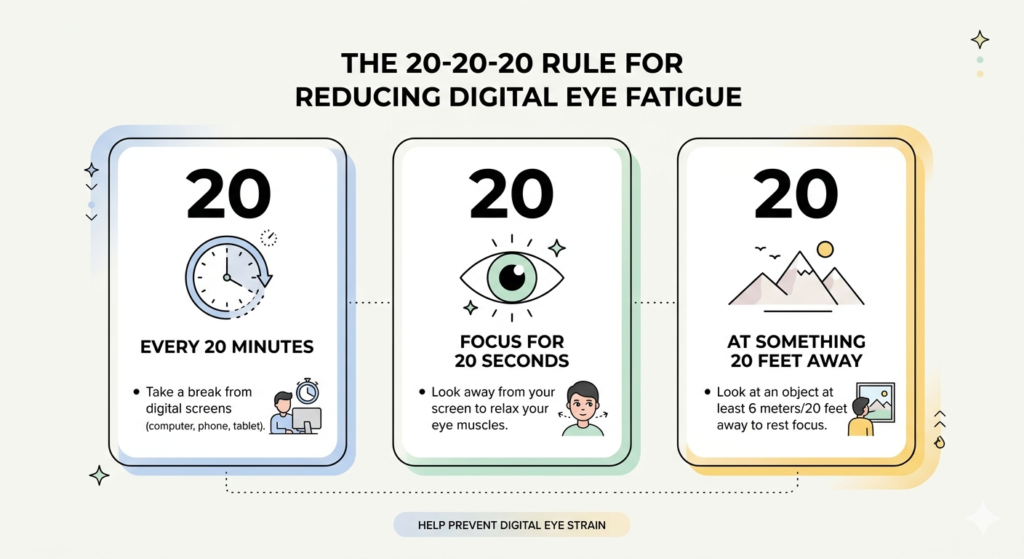
Mastering the 20-20-20 Rule
The most effective, universally recommended habit for visual relief is deceptively simple. It is designed to physically force your eye muscles to release their near-focus tension.
This is known as the 20-20-20 rule. Every 20 minutes, you should look at an object that is at least 20 feet away for a full 20 seconds. Looking into the distance allows the ciliary muscles—the muscles responsible for focusing on close objects—to completely relax.
Set a repeating, gentle alarm on your phone or use a desktop timer to build this habit. Taking 20 seconds to stare out a window or down a long hallway acts as a micro-vacation for your nervous system and instantly halts the accumulation of visual fatigue.
Practicing Conscious Blinking Exercises
As previously noted, staring at a computer screen causes your natural blink rate to plummet by more than half. This rapid reduction causes the protective tear film over your eyes to evaporate, leading to severe dryness and burning.
To combat this, you must introduce conscious blinking exercises into your routine. Every time you complete a small task—such as hitting ‘send’ on an email or finishing a paragraph—close your eyes tightly for two seconds, then open them. This “hard blink” engages the meibomian glands in your eyelids, forcing them to secrete the essential oils that prevent tears from evaporating.
Over time, you can train your brain to associate specific digital actions with a hard blink, naturally restoring the moisture balance to your eyes without needing chemical drops.
Optimizing Monitor Distance and Angle
Your physical proximity to your screen dictates how hard your eyes have to work to maintain a single, focused image. Poor positioning forces the eyes to continuously converge (turn inward), leading to rapid exhaustion.
Proper monitor distance is generally considered to be an arm’s length away, roughly 20 to 28 inches from your face. If you cannot comfortably read the text at this distance, do not lean closer; instead, increase the default font size in your computer’s display settings.
Furthermore, the angle is critical. The top of your monitor should be at or slightly below your horizontal eye level. This downward viewing angle means your eyelids naturally cover a larger portion of your eyeball, significantly reducing the surface area exposed to the air and slowing tear evaporation.
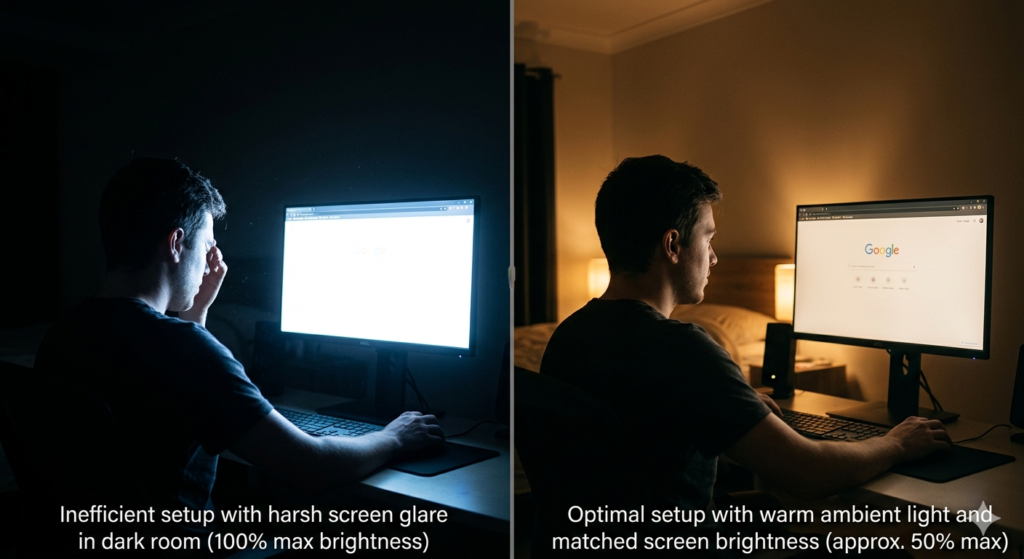
Adjusting Screen Brightness Settings and Lighting
Your screen should never look like a glowing lightbulb in a dark room. High contrast between your monitor and the surrounding environment forces your pupils to continuously expand and contract, causing rapid fatigue.
Your screen brightness settings should roughly match the ambient lighting of the room you are in. If you hold a piece of white paper next to your monitor, the screen should not be noticeably brighter or darker than the physical paper.
Additionally, be mindful of overhead glare reflecting off your screen into your eyes. Utilizing a high-quality monitor light bar (screenbar) is an excellent way to illuminate your immediate desk area evenly without casting a harsh glare onto the display itself. This softens the contrast and creates a much gentler viewing experience.
Conclusion
Knowing how to reduce digital eye strain requires proactive, daily management of your workspace and habits. By committing to the 20-20-20 rule, you give your eye muscles the frequent rest they biologically require. Incorporating blinking exercises naturally restores moisture, while maintaining a proper monitor distance and adjusting your screen brightness settings eliminates unnecessary physical strain. By making these small but powerful ergonomic adjustments, you can successfully mitigate daily discomfort and protect your visual health for the long term.
Frequently Asked Questions (FAQ)
What is the 20-20-20 rule?
The 20-20-20 rule is a visual relief exercise designed to prevent eye strain. It dictates that for every 20 minutes of screen time, you should look at an object at least 20 feet away for a duration of 20 seconds to relax your focusing muscles.
How far away should my monitor be?
Your computer monitor should ideally be positioned about an arm’s length away from your face, which is typically between 20 and 28 inches. The top edge of the screen should be at or slightly below eye level.
Why do I forget to blink when looking at a screen?
When humans engage in highly demanding cognitive or visual tasks—like reading digital text or processing fast-moving media—the brain suppresses the automatic blink reflex to ensure no visual information is missed. This drops the blink rate by up to 66%.
How should I set my screen brightness?
Your screen brightness should match the ambient light in your immediate environment. It should not be the brightest light source in the room, nor should it be so dark that you have to squint to read the text.